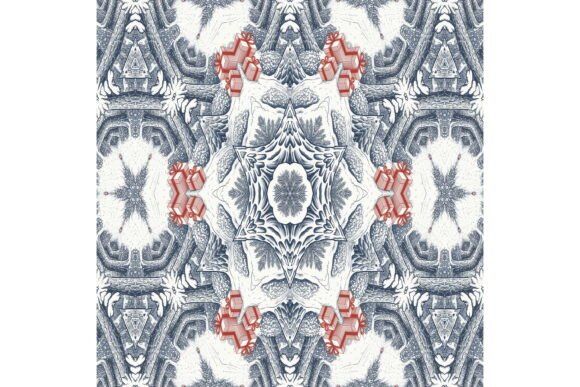
Christmas Fantasy 502: A Winter Forest Pattern That Delivers—If You Use It Right
Christmas Fantasy 502 isn’t just another holiday pattern—it’s a meticulously crafted, high-resolution winter forest scene featuring snow-dusted fir trees in soft blue-grey and white tones, punctuated by cheerful stacks of red gifts. At 3600 × 3600 pixels and 300 dpi, it’s built for real-world use: crisp printing, seamless repeats for fabric or wrapping paper, and pixel-perfect digital applications from blog banners to book covers. But like many versatile design assets, its full potential only unfolds when used with intention—not assumption.
What People Often Misunderstand About Christmas Fantasy 502
Many assume that because it’s labeled “Christmas-themed” and “repeating,” it will automatically tile flawlessly across any surface—or that its wintry palette will suit every project without adjustment. In reality, the subtle blue-grey undertones can shift dramatically depending on your screen calibration or print substrate. One designer ordered 500 custom gift tags, only to find the cool tones looked muted on uncoated kraft paper—making the red gifts appear dull instead of vibrant. Another used it as a video game UI background, but didn’t account for how the dense tree repetition could visually compete with interface elements, causing readability issues.
It’s also easy to overlook that “repeating pattern” doesn’t mean “infinitely flexible.” Christmas Fantasy 502 is designed for horizontal and vertical tiling, yes—but its 3600 × 3600 square format means cropping or scaling without preserving aspect ratio can break the rhythm of the forest layout, turning elegant repetition into jarring visual gaps or overlaps.
Mistake #1: Assuming It Works “Out of the Box” for All Print Projects
Not all printers handle RGB-to-CMYK conversion the same way—and Christmas Fantasy 502 is typically delivered in RGB for digital flexibility. If you send it straight to a commercial printer without converting and soft-proofing, those delicate blue-greys may shift toward purple or brown, and the red gifts can lose saturation. Solution: Always request a color proof from your printer first. For best results, convert to CMYK using a standard profile like ISO Coated v2, then adjust levels slightly to preserve contrast between snow, bark, and ribbon details.
Mistake #2: Using It at Small Scale Without Testing Legibility
This pattern shines at larger sizes—think posters, fabric yardage, or full-page stationery—but shrinks poorly in contexts like social media avatars or app icons. At under 300px wide, the repeating trees blur together, and the red gifts vanish into noise. Solution: If you need a smaller version, extract a single motif (e.g., one stack of gifts with surrounding branches) and simplify it manually—don’t rely on automatic downscaling. Or pair Christmas Fantasy 502 with a clean, minimalist secondary graphic for balance.
Mistake #3: Overlooking Licensing Scope Before Commercial Use
The file itself is technically ready for use—but whether you’re selling greeting cards, launching an Etsy shop, or branding a holiday pop-up event depends entirely on the license you acquire. Some versions permit unlimited personal and commercial use; others restrict resale of derivative patterns or require attribution. One small business owner assumed their standard license covered apparel production, only to receive a polite but firm notice after printing 200 scarves. Solution: Read the license terms *before* purchase—not after. Look specifically for clauses about “end products,” “merchandise,” and “sublicensing.” When in doubt, contact the seller directly with your intended use case.
What to Check Before You Download or Buy
Before adding Christmas Fantasy 502 to your cart or library, verify these four things:
- File format compatibility: Confirm it’s delivered as a JPG (as advertised), not PNG or PSD—unless you specifically need transparency or layers. JPG is ideal for print and web backgrounds, but won’t support drop shadows or editable text overlays.
- True repeat integrity: Zoom in on the edges in your image editor. Do the trees align cleanly top-to-bottom and left-to-right? A well-built repeating pattern should show no visible seams—even when tiled in Photoshop or Illustrator.
- Color profile inclusion: While not always bundled, a file with an embedded sRGB profile ensures consistent on-screen previews across devices. If it’s missing, assign sRGB manually before editing.
- Intended resolution match: You need 300 dpi for physical prints (like invitations or posters), but 72 dpi is sufficient for web banners or email headers. Don’t pay extra for “high-res” if your use case is purely digital—unless you anticipate future print needs.
Better Ways to Apply Christmas Fantasy 502 Across Projects
Think beyond “background.” This pattern excels when treated as a design collaborator—not just decoration. For example:
- Stationery: Use it as a subtle watermark behind hand-lettered holiday messages—reduce opacity to 12–15% so the forest adds texture without competing.
- Fashion design: Rotate the canvas 45° before tiling to create diagonal rhythm in scarf or dress fabric layouts—this softens the grid-like formality and enhances flow.
- Educational materials: Teachers have printed sections of the pattern on cardstock, cut them into puzzle pieces, and used them for seasonal vocabulary sorting (e.g., “fir,” “snow,” “gift,” “ribbon”)—leveraging visual recognition alongside language learning.
- Digital publishing: On blogs or newsletters, apply Christmas Fantasy 502 as a section divider background (not full-width) behind a single headline—then overlay semi-transparent white text boxes for clarity and contrast.
Ultimately, Christmas Fantasy 502 rewards thoughtful integration. Its quiet elegance comes through not when it’s everywhere, but when it’s placed with purpose—supporting your message, enhancing usability, and honoring the care that went into its creation. Whether you’re prototyping a new product line or crafting a heartfelt card, let the pattern serve your intent—not the other way around.